A CI/CD Pipeline with GitHub Actions, Docker, and EC2
From git push to production with zero manual steps
- GitHub Actions
- Docker
- EC2
- CI/CD
- Next.js
- DevOps
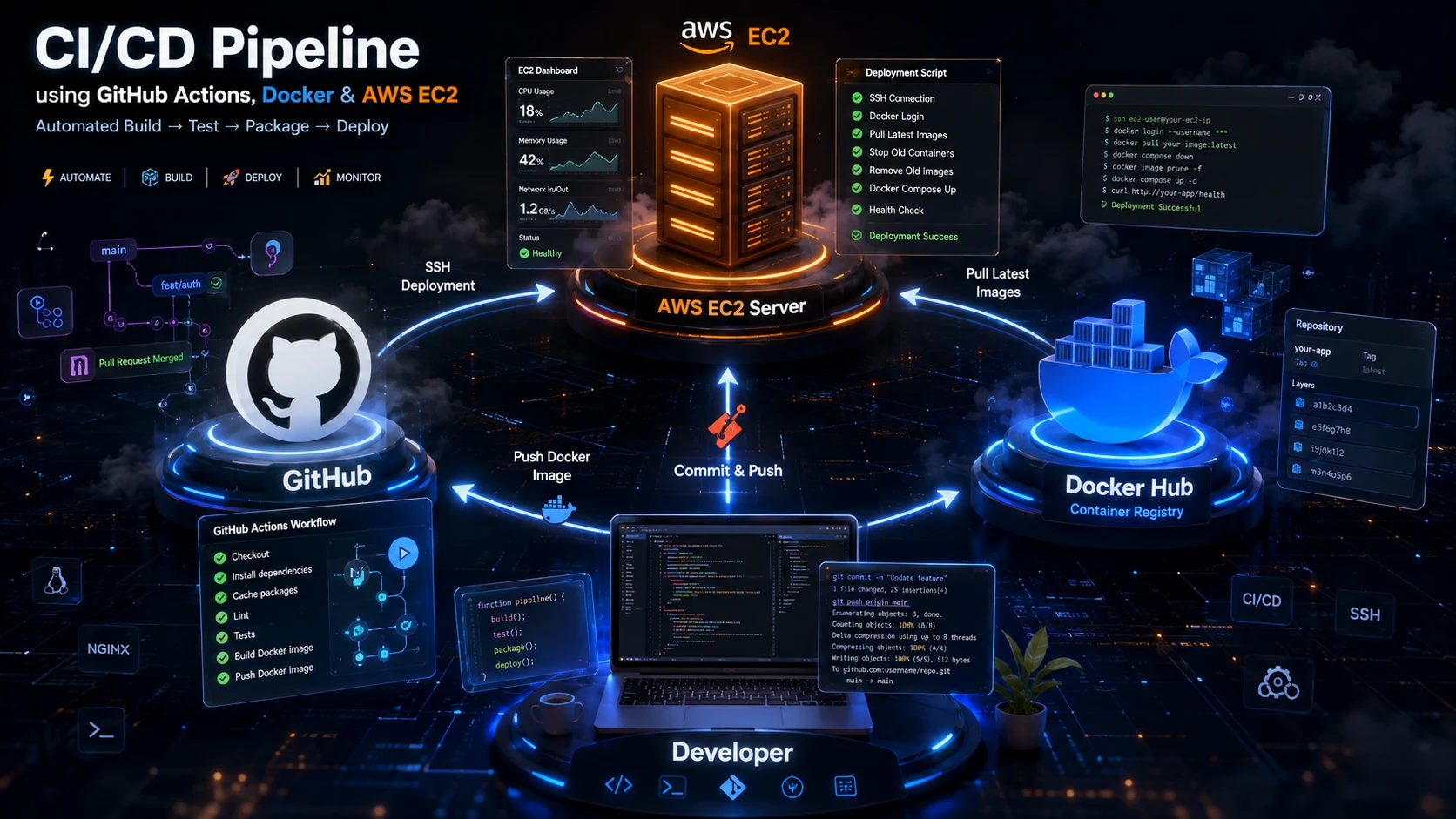
Every time a dev push to main, a fully automated pipeline starts: it lints and type-checks the code, builds the Next.js app, packages it into Docker images, pushes those images to Docker Hub, and finally deploys them onto a live EC2 instance — with zero manual steps in between.
In this post I’ll walk through exactly how that pipeline works, using the real configuration from BookFetch — a full-stack Next.js bookstore — including the GitHub Actions workflow, a multi-stage Dockerfile, two docker-compose files (one for local dev, one for production), and a small deployment script that runs on the server.
The big picture
The pipeline has four stages that run in sequence, each gating the next:
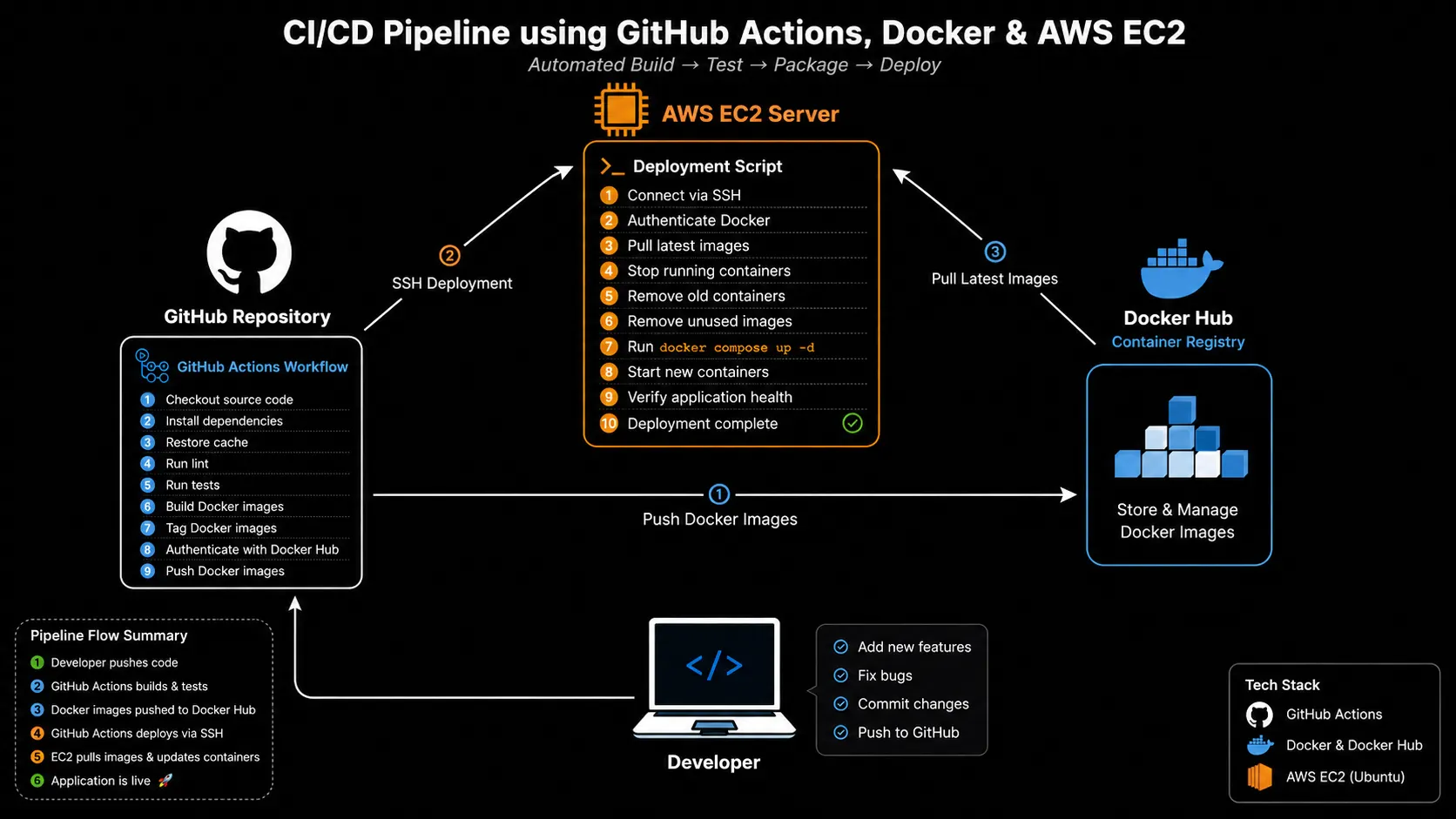
If any stage fails, the pipeline stops there — a broken build or a failing lint check never makes it anywhere near Docker Hub or the production server. The docker and deploy jobs also only run on pushes to main (not on pull requests), so opening a PR gives you fast feedback without ever touching production infrastructure.
Here’s the whole thing, defined in .github/workflows/ci-cd.yml:
name: CI/CD

on:
  push:
    branches: [main]
  pull_request:
    branches: [main]

concurrency:
  group: ci-cd-${{ github.ref }}
  cancel-in-progress: true
Two small but important details up front:
- It triggers on both
pushandpull_request. PRs get thequalityandbuildjobs so you catch problems before merging, butdockeranddeployare gated withif: github.event_name == 'push' && github.ref == 'refs/heads/main'. concurrencycancels in-flight runs. If you push twice in quick succession, the older run for the same branch is cancelled rather than racing the newer one to deploy — which matters a lot once you get to the “SSH into the server and rundocker compose up” stage.
Let’s go through each job.
Stage 1: Quality checks
jobs:
  quality:
    name: Quality checks
    runs-on: ubuntu-latest
    steps:
      - uses: actions/checkout@v4
      - uses: actions/setup-node@v4
        with:
          node-version: 22
          cache: npm
      - run: npm ci
      - run: npm run type-check
      - run: npm run lint
      - run: npm run format:check
This is the cheapest, fastest feedback loop: TypeScript type-checking, ESLint, and a Prettier format check. npm ci (rather than npm install) is used because it installs exactly what’s in package-lock.json, which keeps CI runs reproducible and noticeably faster thanks to npm’s caching.
Note the HUSKY: 0 environment variable set at the workflow level — this disables Husky git hooks during npm ci, since there’s no .git hook context to run them against in CI, and no .env in the runner either, so a placeholder DATABASE_URL is provided for anything that needs one to boot (like Prisma’s client generation).
Stage 2: Build
build:
  name: Build
  needs: quality
  runs-on: ubuntu-latest
  steps:
    - uses: actions/checkout@v4
    - uses: actions/setup-node@v4
      with:
        node-version: 22
        cache: npm
    - run: npm ci
    - run: npm run build
With needs: quality, this job won’t even start until linting and type-checking pass. It runs a full next build to make sure the application actually compiles in a clean environment — separate from whatever might be cached on a developer’s laptop. This is deliberately kept separate from the Docker stage: it’s a fast sanity check that fails loudly (and cheaply, without spinning up Buildx) before we invest time in building container images.
Stage 3: Docker build and push
This is where the pipeline starts producing real deployable artifacts.
docker:
  name: Docker build and push
  needs: build
  runs-on: ubuntu-latest
  if: github.event_name == 'push' && github.ref == 'refs/heads/main'
  steps:
    - uses: actions/checkout@v4
    - uses: docker/setup-buildx-action@v3
    - uses: docker/login-action@v3
      with:
        username: ${{ secrets.DOCKERHUB_USERNAME }}
        password: ${{ secrets.DOCKERHUB_TOKEN }}

    - name: Build and push app image
      uses: docker/build-push-action@v6
      with:
        context: .
        file: Dockerfile
        target: runner
        push: true
        tags: |
          ${{ secrets.DOCKERHUB_USERNAME }}/bookstore-app:${{ github.sha }}
          ${{ secrets.DOCKERHUB_USERNAME }}/bookstore-app:latest
        cache-from: type=gha
        cache-to: type=gha,mode=max

    - name: Build and push migrate image
      uses: docker/build-push-action@v6
      with:
        context: .
        file: Dockerfile
        target: migrator
        push: true
        tags: |
          ${{ secrets.DOCKERHUB_USERNAME }}/bookstore-migrate:${{ github.sha }}
          ${{ secrets.DOCKERHUB_USERNAME }}/bookstore-migrate:latest
        cache-from: type=gha
        cache-to: type=gha,mode=max
A few design choices worth calling out:
- Two images, one Dockerfile. The
targetfield tells Buildx which stage of the multi-stageDockerfileto build:runnerproduces the slim app image that actually serves traffic, andmigratorproduces a separate image whose only job is to runprisma migrate deployagainst the production database. Splitting these means the app container never needs the full build toolchain or migration CLI baked in. - Dual tagging. Every image is pushed as both
:${{ github.sha }}(an immutable, traceable tag) and:latest. The SHA tag is what actually gets deployed — it’s exact and reproducible.:latestis kept around mostly for convenience (e.g., pulling manually to debug). - GitHub Actions cache (
type=gha). Docker layer caching is persisted across workflow runs using GitHub’s own cache backend, so unchanged layers (likenpm ciin thedepsstage) don’t get rebuilt on every push. This is a big win for build time as the dependency tree grows.
Inside the Dockerfile
The multi-stage Dockerfile this job targets looks like this:
FROM node:22-alpine AS base
RUN apk add --no-cache libc6-compat openssl
WORKDIR /app

FROM base AS deps
COPY package.json package-lock.json ./
COPY prisma ./prisma
COPY prisma.config.ts ./
RUN npm ci

FROM base AS builder
COPY --from=deps /app/node_modules ./node_modules
COPY . .
RUN npx prisma generate && npm run build

FROM builder AS migrator
CMD ["node", "node_modules/prisma/build/index.js", "migrate", "deploy"]

FROM base AS runner
RUN addgroup --system --gid 1001 nodejs \
  && adduser --system --uid 1001 --ingroup nodejs nextjs
COPY --from=builder /app/public ./public
COPY --from=builder --chown=nextjs:nodejs /app/.next/standalone ./
COPY --from=builder --chown=nextjs:nodejs /app/.next/static ./.next/static
COPY --chmod=755 docker/entrypoint.sh ./docker-entrypoint.sh
USER nextjs
EXPOSE 3000
ENTRYPOINT ["./docker-entrypoint.sh"]
CMD ["node", "server.js"]
Each stage has a clear job:
base— a shared Alpine Node.js image with the native libraries (libc6-compat,openssl) that Prisma’s engine needs to run on musl-based Alpine.deps— installsnode_modulesin isolation, keyed only onpackage.json/package-lock.json. Docker’s layer cache means this only re-runs when dependencies actually change, not on every code edit.builder— copies in the rest of the source, generates the Prisma client, and runsnext build. Next.js’s standalone output mode is what makes the next stage possible.migrator— branches offbuilderand just overrides theCMDto runprisma migrate deploy. It reuses the exact same build output, so the migration always matches the schema the app was built against.runner— the actual production image, built from the lightweightbase(notbuilder), copying in only the standalone server bundle, static assets, and public files. It also creates and switches to a non-rootnextjsuser before exposing port 3000 — a basic but important container security practice.
This “standalone + non-root final stage” pattern keeps the production image small (no node_modules, no source code, no dev dependencies) and reduces the attack surface.
Stage 4: Deploy to EC2
Once images are pushed, the final job ships them to the server:
deploy:
  name: Deploy to EC2
  needs: docker
  runs-on: ubuntu-latest
  if: github.event_name == 'push' && github.ref == 'refs/heads/main'
  steps:
    - uses: actions/checkout@v4

    - name: Prepare deploy bundle
      run: |
        mkdir -p deploy-bundle
        cp docker-compose.prod.yml deploy-bundle/
        cp scripts/ec2-deploy.sh deploy-bundle/

    - name: Ensure deploy directory exists on EC2
      uses: appleboy/ssh-action@v1.2.0
      with:
        host: ${{ secrets.EC2_HOST }}
        username: ${{ secrets.EC2_USER }}
        key: ${{ secrets.EC2_SSH_PRIVATE_KEY }}
        script: |
          sudo mkdir -p /opt/bookstore
          sudo chown -R "$USER":"$USER" /opt/bookstore

    - name: Copy deploy files to EC2
      uses: appleboy/scp-action@v0.1.7
      with:
        host: ${{ secrets.EC2_HOST }}
        username: ${{ secrets.EC2_USER }}
        key: ${{ secrets.EC2_SSH_PRIVATE_KEY }}
        source: deploy-bundle/*
        target: /opt/bookstore
        strip_components: 1

    - name: Deploy via SSH
      uses: appleboy/ssh-action@v1.2.0
      with:
        host: ${{ secrets.EC2_HOST }}
        username: ${{ secrets.EC2_USER }}
        key: ${{ secrets.EC2_SSH_PRIVATE_KEY }}
        script: |
          chmod +x /opt/bookstore/ec2-deploy.sh
          /opt/bookstore/ec2-deploy.sh ${{ github.sha }}
Notice what’s not in this job: there’s no source code checkout onto the server, no npm install, no build step running on the EC2 box at all. The server only ever receives two small files — docker-compose.prod.yml and ec2-deploy.sh — via scp. Everything else it needs (the actual application) is pulled as a pre-built image from Docker Hub. This keeps the EC2 instance dumb and stateless from a deployment perspective: it doesn’t need Node.js, a build toolchain, or even a copy of the repository.
Authentication to the server is handled entirely through GitHub Secrets (EC2_HOST, EC2_USER, EC2_SSH_PRIVATE_KEY), so no credentials ever touch the workflow file itself.
The final step hands off to a shell script on the server, passing the commit SHA as an argument — this is the same SHA that was used to tag the Docker images two jobs ago, which is what ties the whole pipeline together.
The deploy script
#!/bin/bash
set -euo pipefail

IMAGE_TAG="${1:?Usage: ec2-deploy.sh <git-sha>}"

cd /opt/bookstore

if [ ! -f .env ]; then
  echo "Missing /opt/bookstore/.env — create it before deploying." >&2
  exit 1
fi

set -a
source .env
set +a

echo "$DOCKERHUB_TOKEN" | docker login -u "$DOCKERHUB_USERNAME" --password-stdin

export DOCKER_IMAGE_TAG="$IMAGE_TAG"

docker compose -f docker-compose.prod.yml pull
docker compose -f docker-compose.prod.yml up -d --remove-orphans
docker image prune -f

echo "Deployed image tag: $DOCKER_IMAGE_TAG"
A few things make this script safe to run unattended, repeatedly, over SSH:
set -euo pipefailensures any failure (missing file, failed command, unset variable) stops the script immediately instead of silently continuing with a half-broken deploy.- It refuses to run without a
.envfile. Secrets likeJWT_ACCESS_SECRET,JWT_REFRESH_SECRET, and the Docker Hub credentials live only on the server in/opt/bookstore/.env— they’re never passed through GitHub Actions or committed anywhere. DOCKER_IMAGE_TAGis exported, not hardcoded. This env var is whatdocker-compose.prod.ymlinterpolates into the image references, so the exact commit SHA built two stages earlier is what actually gets deployed — no ambiguity, no accidentally running a stale:latest.docker compose pullbeforeup -dguarantees the new images are fetched before containers are recreated, and--remove-orphanscleans up any containers from services that may have been removed from the compose file over time.docker image prune -fat the end keeps old, now-unused image layers from slowly filling up the EC2 instance’s disk over months of deploys.
Local dev vs. production compose
It’s worth comparing the two compose files side by side, since the differences reveal the design intent:
# docker-compose.yml (local dev)
app:
  build:
    context: .
    dockerfile: Dockerfile
    target: runner
  ports:
    - "${APP_PORT:-3000}:3000"
# docker-compose.prod.yml (production)
app:
image: "${DOCKERHUB_USERNAME}/bookstore-app:${DOCKER_IMAGE_TAG:-latest}"
pull_policy: always
ports:
- "${APP_PORT:-3000}:3000"Locally, docker-compose.yml builds the image from source on your machine (build: + target: runner) — convenient for iterating without needing to push anywhere. In production, docker-compose.prod.yml never builds anything; it only references pre-built images by tag (image: + pull_policy: always). This is exactly the separation you want: build once in CI, run everywhere else.
Both files share the same shape otherwise — a postgres service with a health check, a migrate service that runs prisma migrate deploy and must complete successfully (condition: service_completed_successfully) before the app service starts, and the same required environment variables (JWT_ACCESS_SECRET, JWT_REFRESH_SECRET) enforced via Compose’s ${VAR:?error message} syntax, which fails fast with a clear error if a secret is missing rather than booting the app in a broken state.
Putting it all together
Here’s the full lifecycle of a single commit to main:
- Push to
main. qualityruns type-checking, linting, and format checks against the new code.buildcompiles the app in a clean CI environment to catch build-time errors early.dockerbuilds two images from the sameDockerfile(runnerfor the app,migratorfor schema migrations), tags both with the commit SHA andlatest, and pushes them to Docker Hub — using GitHub Actions’ cache to keep rebuilds fast.deploycopiesdocker-compose.prod.ymlandec2-deploy.shto the EC2 instance, then runs the script remotely with the commit SHA as the target image tag.- On the server,
ec2-deploy.shlogs into Docker Hub, pulls the tagged images, runsmigrateto bring the database schema up to date, starts theappcontainer, and prunes old images.
The result is a deploy pipeline where:
- Every deployed artifact is traceable back to an exact commit via its image tag.
- The build happens exactly once, in CI — never on the production server.
- Secrets stay where they belong: GitHub Secrets for CI/SSH access, and a server-local
.envfor runtime application secrets. - A single
git pushis the only manual action required to ship a change from a laptop to production.
That’s the whole pipeline — no external CD platform, no Kubernetes cluster, just GitHub Actions, Docker Hub, and a bash script over SSH. For a small-to-medium production app, it’s a surprisingly complete and low-maintenance setup.
If you want to explore the full setup, clone the repo, or run the project locally, everything lives in the BookFetch repository on GitHub.